Inside Python’s Modules and Packages: The Machinery Behind import
A reference-grade walk through Python’s import system: path resolution, package types, the spec → finder → loader pipeline, and the hooks that let you bend it
Software Engineering
Author
Imad Dabbura
Published
February 9, 2024
Modified
July 6, 2026
evergreen
Introduction
Every Python program you have ever written begins with import. You type import pandas as pd or from mypackage.utils import clean, the name resolves, and you move on. But what actually happens in the fraction of a second between that statement and the module being ready to use? Where does Python look? Why can two directories with the same name merge into a single package? How does import tell a built-in module apart from a .py file on disk from a compiled extension, and why can you intercept that decision to, say, install a missing package on the fly?
The import system is one of the most powerful and least understood parts of Python. It is not magic: it is a small, well-defined pipeline of objects (finders, loaders, and specs) that you can inspect, extend, and replace at runtime. Understanding it is the difference between someone who uses imports and someone who can debug a ModuleNotFoundError that makes no sense, build a plugin system, or reason about why a reload left their program in a broken state.
By the end of this post, you will be able to:
Trace exactly what happens when Python executes import x, step by step.
Explain the difference between a module and a package, and between regular and namespace packages, and why both exist.
Read a ModuleSpec and follow the finder → loader → module pipeline that produces it.
Extend the import system yourself: trace imports, lazy-load expensive modules, and hook sys.meta_path.
Avoid the classic traps: reload “zombies”, brittle absolute imports, and cache corruption.
We start with the ten-thousand-foot view of what import does, then work downward: the object model of modules and packages, how Python finds them (sys.path), how it loads them (specs, finders, loaders), how source gets compiled and cached, the hooks that let you bend the machinery, running packages as programs, and finally the failure modes worth knowing. Every claim is backed by a live snippet you can run yourself.
NoteVersions and environment
The examples were run on CPython 3.14. The import system has been stable since its “reboot” in Python 3.3–3.4 (PEP 451), so everything here applies to any modern Python 3. Output that shows filesystem paths or the contents of sys.meta_path is environment-specific. Yours will differ in the details, not the shape.
Setup: a scratch workspace for the live demos (click to expand)
import sys, os, tempfile, textwrap, importlib, importlib.util, types, builtinsWORKSPACE = tempfile.mkdtemp(prefix="import-demo-")sys.path.insert(0, WORKSPACE)def write_module(relpath, source):"""Write a module (or package file) under WORKSPACE; return its path.""" path = os.path.join(WORKSPACE, relpath) os.makedirs(os.path.dirname(path) or WORKSPACE, exist_ok=True)withopen(path, "w") as f: f.write(textwrap.dedent(source).lstrip())return path
1. What import Actually Does
Before dissecting any individual piece, hold the whole pipeline in your head. When you write import spam, Python runs four steps in order:
Search: walk a chain of finders, asking each “do you know how to locate spam?” The winner returns a spec: metadata describing where the module is and how to load it.
Create: build an empty module object (types.ModuleType) and set its attributes (__name__, __file__, __spec__, …).
Execute: run the module’s code with the module’s own __dict__ as its global namespace. This is what populates it with functions, classes, and variables.
Bind: bind the resulting module object to a name in the scope that issued the import.
Two facts do most of the work here. First, the finished module is cached in sys.modulesbefore it is executed, and every later import of the same name is a plain dictionary lookup, not a re-execution:
import jsonfirst = sys.modules["json"]import json # a second import is a dict lookup, not a re-runfirst is sys.modules["json"]
True
sys.modules is why importing a module a thousand times costs almost nothing, and why a module’s top-level code runs exactly once per interpreter session. Second, “executing the module” is literally running its file top to bottom. There is no separate “definition mode.” A module is the accumulated side effects of running its source.
import is not a keyword that reads a file. It is a cache lookup that, on a miss, runs a find → create → execute → bind pipeline and memoizes the result.
2. Modules and Packages: The Object Model
2.1 A module is just a namespace object
A module is not a special language construct; it is an ordinary object of type types.ModuleType whose attributes live in its __dict__. Accessing json.loads is a dictionary lookup in json.__dict__; setting an attribute on a module writes to that same dict:
module.x = 10 and module.__dict__["x"] = 10 are the same operation. This is why a module can play so many roles at once: a namespace, an execution environment for statements, and a container of globals. Every module carries a handful of dunder attributes that the import system sets on it:
Attribute
Meaning
__name__
Fully-qualified module name ("json", "os.path")
__file__
Path to the source file, if it has one (built-ins don’t)
__doc__
The module docstring
__dict__
The module’s namespace: everything defined at top level
__package__
The package this module belongs to (see §2.2)
__path__
Present only on packages: the search path for submodules
__spec__
The ModuleSpec used to load it (see §4)
__loader__
The loader object that executed it
2.2 A package is a module with a __path__
A package is simply a module that has a __path__ attribute.__path__ is a list of directories to search when importing that package’s submodules; it is to a package what sys.path is to the interpreter. A plain module has no __path__; a package does, and that is what lets import foo.bar know where to find bar.
All packages are modules, but not all modules are packages; only packages have __path__.
For __package__: a package’s __package__ equals its own __name__; a top-level module’s is the empty string; a submodule’s is its parent package’s name.
2.3 Regular vs. namespace packages
A regular package is a directory containing an __init__.py. Importing it runs that __init__.py, and its namespace becomes the package. Crucially, when the finder locates a regular package it stops searching: the first __init__.py of that name on sys.path wins.
A namespace package is a directory without__init__.py (PEP 420). It behaves completely differently during search: the finder does not stop at the first match. It scans all of sys.path, collecting every directory of that name, and, if it never finds a regular package with that name, fuses the collected directories into a single package whose __path__ spans every one of them.
Regular package
Namespace package
Marker
Has __init__.py
No __init__.py
Search behavior
Stops at first match
Scans all of sys.path, collects every match
__init__.py runs
Yes
N/A
__path__
Single directory
_NamespacePath spanning multiple directories
Priority
Always wins over a namespace package of the same name
Used only if no regular package shadows it
Use case
Normal, self-contained package
One logical package split across installs (plugin ecosystems)
The same package name can pull submodules from completely different directories. Let’s prove it. We create two separate directories, each holding a pck/ folder with no__init__.py, and put a different submodule in each:
# Two directories, each with a `pck/` folder that has NO __init__.py -> namespace pkgwrite_module("locA/pck/mod.py", "X = 100")write_module("locB/pck/test.py", "X = 200")sys.path[:0] = [f"{WORKSPACE}/locA", f"{WORKSPACE}/locB"]from pck.mod import X as from_Afrom pck.test import X as from_Bfrom_A, from_B, list(sys.modules["pck"].__path__)
The single name pck now resolves to a package whose __path__ lists both temp directories, and pck.mod and pck.test were imported from different places on disk. This is exactly how large namespaced ecosystems (like the google.* cloud libraries) let independently-installed distributions contribute modules under one shared name.
WarningRegular packages win and shadow the rest
Python scans the entire sys.path before concluding a package is a namespace package. If any directory on the path contains that name with an __init__.py, the regular package wins and every namespace candidate is discarded. A stray __init__.py in the wrong place can silently “capture” a name you expected to be a namespace package.
2.4 What __init__.py is for
Beyond marking a directory as a regular package, __init__.py runs the first time the package is imported, which makes it the natural place to shape the package’s public surface. Common uses:
Re-export the useful names from submodules so callers write from mypkg import Thing instead of from mypkg.internal.things import Thing.
Assemble __all__ from submodules to control from mypkg import *, e.g. __all__ = submod_a.__all__ + submod_b.__all__ (import the submodules first so their __all__ exists).
Initialize package-level state, or occasionally monkeypatch another module.
Keep __init__.py cheap: because it runs on first import, expensive work there is paid by every program that imports the package, whether or not it needs that work.
2.5 Dotted imports bind submodules to their parents
Importing foo.bar.baz imports foo, then foo.bar, then foo.bar.baz, in that order, caching each of the three separately in sys.modules. A subtle but important side effect: when a submodule is loaded, it is bound as an attribute on its parent package. After import os.path, the parent module os gains a path attribute pointing at the submodule:
import os.path"os.path"in sys.modules, hasattr(os, "path"), os.path is sys.modules["os.path"]
(True, True, True)
This is why import os.path lets you write os.path.join(...) even though you only named os: the submodule attached itself to its parent during import.
3. Finding Modules: sys.path and the Search Space
For file-based imports, the search space is sys.path: an ordered list of locations (directories, zip files, .egg archives) that Python walks front to back, first match wins. If nothing matches, you get ModuleNotFoundError.
Where do these entries come from? Python assembles sys.path at startup from several sources:
The script’s directory (or the current working directory in an interactive session), added at the front, which is why a local math.py shadows the standard library.
PYTHONPATH, if set, prepended to the front.
The standard library, located relative to the interpreter.
Site packages: where third-party installs live, added by site.py.
.pth files in site-packages: each line names a directory to append. Package managers and editable installs use this hook to inject paths.
Two values anchor the whole scheme. sys.prefix is where the Python installation lives (its landmark is the standard library’s os.py); sys.exec_prefix is where platform-specific compiled binaries live (landmark: the lib-dynload directory). A virtual environment is, at heart, a directory with its own sys.prefix and site-packages, sharing the base interpreter’s binary.
A few command-line switches and environment knobs shape all of this:
Flag / mechanism
Effect on the import environment
python -m pkg.mod
Run a module/package as __main__ (relative imports work; see §7)
python -S
Skip site.py: no site-packages, no .pth processing
python -v / -vv
Trace import activity (what Python tries, and where)
PYTHONPATH=…
Prepend directories to sys.path
python -m venv env
Create a virtual environment with its own prefix and site-packages
Tipsys.path is only half the story
sys.path answers “where on the filesystem do I look?”, but it is consulted by only one of the finders on sys.meta_path (the PathFinder). Built-in and frozen modules never touch sys.path. The real dispatch layer is sys.meta_path, which we get to in §4.4.
4. Loading Modules: Specs, Finders, and Loaders
4.1 The ModuleSpec: a module’s blueprint
Since the Python 3.4 import reboot (PEP 451), the central object of the import system is the ModuleSpec: the metadata bundle that says what a module is and how to load it. You can obtain one without importing anything via importlib.util.find_spec:
importlib.util.find_spec("sys") # a built-in: origin is 'built-in', no file
The contrast tells the story: sys is a built-in with origin='built-in' and no file; pandas is a source package whose origin is its __init__.py and whose submodule_search_locations is the __path__ it will receive. The spec’s important fields:
Field
Meaning
name
Fully-qualified module name
loader
The object that will execute the module
origin
Where it comes from ('built-in', a file path, …)
submodule_search_locations
The future __path__: non-None only for packages
parent
Enclosing package name
cached
Location of the compiled .pyc, if any
4.2 The import algorithm, in pseudocode
Stripped to essentials, importing a not-yet-cached module looks like this:
import sysdef import_module(name):if name in sys.modules: # 1. cache hit -> donereturn sys.modules[name] spec = find_spec(name) # 2. search: finders -> spec (or ImportError) module = importlib.util.module_from_spec(spec) # 3. create the empty module sys.modules[name] = module # 4. cache BEFORE executing (circular-safe) spec.loader.exec_module(module) # 5. execute the body into module.__dict__return sys.modules[name] # 6. return cached (may differ if code swapped it)
Two details are worth internalizing. The module is cached before it is executed, so a circular import finds a partially-initialized module rather than looping forever. And the cached object is what’s returned: a module that reassigns sys.modules[__name__] to something else during execution can hand back a different object than the one that started loading.
4.3 Finders and loaders: create vs. execute are decoupled
The pipeline splits cleanly in two. A finder answers “can I locate this name?” and returns a spec. A loader does the work, and even that is split: create_module(spec) builds the empty module object, and exec_module(module) runs its code. importlib.util.module_from_spec gives you the created-but-not-executed module; nothing runs until you call exec_module:
write_module("heavy.py", """ print(">>> heavy.py body is executing") VALUE = 42""")spec = importlib.util.find_spec("heavy")heavy = importlib.util.module_from_spec(spec) # created, but NOT executedhasattr(heavy, "VALUE") # -> False: the body hasn't run
False
spec.loader.exec_module(heavy) # now the body runsheavy.VALUE
>>> heavy.py body is executing
42
This decoupling is exactly what makes lazy loading (§6.3) possible: you can hold a fully-formed module object and defer the expensive exec_module until someone actually touches it.
4.4 sys.meta_path: the real controller
Every import is dispatched through sys.meta_path, an ordered list of meta path finders. Python asks each one, front to back, find_spec(name, path, target) until one returns a spec:
sys.meta_path
[<_distutils_hack.DistutilsMetaFinder at 0x1096146e0>,
 <_virtualenv._Finder at 0x109614590>,
 _frozen_importlib.BuiltinImporter,
 _frozen_importlib.FrozenImporter,
 _frozen_importlib_external.PathFinder,
 <six._SixMetaPathImporter at 0x10a44e900>]
The three that always ship with CPython are BuiltinImporter (compiled-in modules like sys), FrozenImporter (modules frozen into the binary, including importlib itself), and PathFinder, the only one that consults sys.path. Libraries and tools can prepend or append their own finders, so you may also see entries from setuptools or editable installs. Conceptually the search is just:
def find_spec(name, path=None, target=None):for finder in sys.meta_path: spec = finder.find_spec(name, path, target)if spec isnotNone:return specraiseModuleNotFoundError(name)
PathFinder in turn delegates to sys.path_hooks: each sys.path entry is handed to these hooks to produce a path-specific finder (a directory gets a FileFinder; a .zip gets a zipimporter). The results are memoized in sys.path_importer_cache.
This layered design (meta_path → PathFinder → path_hooks → per-entry finder → loader) is the seam that makes §6 possible.
5. Compilation and the .pyc Cache
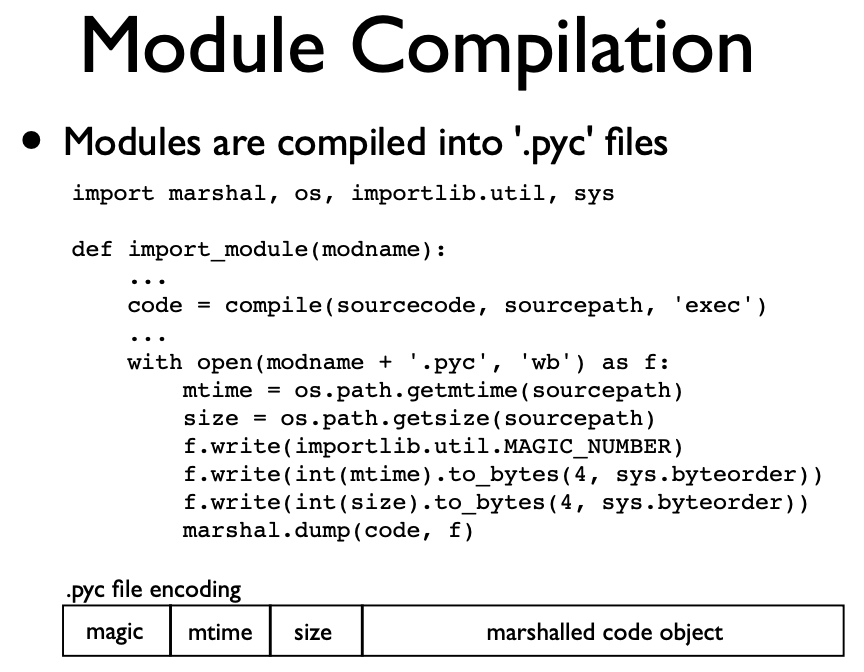
When a loader executes a source module, it doesn’t interpret the .py text directly: it first compiles the source to bytecode (a code object), then executes that. Compilation isn’t free, so CPython caches the result: the bytecode is written to a .pyc file inside a __pycache__/ directory next to the source (PEP 3147). On the next import, if the cache is still valid, Python skips compilation and loads the bytecode directly, which is why the second startup of a program that imports a big library is noticeably faster than the first.
Figure 1: A .pyc file is a small header followed by the marshalled code object. The header holds a magic number (a version tag; bytecode from a different Python version is rejected), plus the source’s mtime and size. On import, Python compares those against the current source file; if either changed, the cache is stale and the module is recompiled. (Slide from David Beazley’s “Modules and Packages: Live and Let Die!”)
importlib.util exposes the pieces of this scheme directly: the version tag, the magic number that gates cache validity, and the function that maps a source path to its cached bytecode path.
The cache_tag (cpython-314) is embedded in the .pyc filename so that multiple Python versions can share a source tree without clobbering each other’s bytecode. Invalidation is normally based on the source’s modification time and size, but Python also supports hash-based.pyc files (comparing a hash of the source instead), which make builds reproducible when timestamps aren’t reliable.
6. Bending the Machinery
Because finders are just objects on a list, you can insert your own and change what importmeans. Two placements matter: prepend to sys.meta_path to intercept every import before the real finders run, or append to catch imports that would otherwise fail.
6.1 Tracing every import
A finder that prints and then returns None observes imports without handling them; returning None politely defers to the finders behind it:
class Watcher:"A meta-path finder that observes imports, then defers by returning None."@classmethoddef find_spec(cls, name, path, target=None):print("find_spec ->", name)returnNone# None => let the finders behind us handle itwrite_module("observed.py", "VALUE = 1")sys.meta_path.insert(0, Watcher) # prepend: we see every import firsttry:import observed # a fresh module, so the finder actually firesfinally: sys.meta_path.remove(Watcher)
find_spec -> observed
The same idea one level up (wrapping builtins.__import__) intercepts the import statement itself:
Append a finder to the end of sys.meta_path and it becomes a last resort, consulted only after every real finder has failed. Here is the (in)famous auto-installer: on the first miss for a top-level name, it pip-installs the package and returns its now-findable spec.
import subprocessclass AutoInstall:"Last-resort finder: pip-install a missing top-level module on first miss." _tried =set()@classmethoddef find_spec(cls, name, path, target=None):if path isnotNoneor name in cls._tried:returnNone# only top-level names, and only try once cls._tried.add(name) subprocess.check_call([sys.executable, "-m", "pip", "install", name])return importlib.util.find_spec(name)sys.meta_path.append(AutoInstall) # append => consulted only after real finders fail
WarningCute, not production
Auto-installing at import time is a great way to understandmeta_path, and a terrible idea in real software: it runs the network and mutates the environment as a side effect of an import, with no version pinning and no reproducibility. Use it to learn; use a real dependency manager to ship.
6.3 Lazy imports
The create/execute split from §4.3 turns lazy loading into a few lines. The standard library ships importlib.util.LazyLoader, which wraps a loader so the module’s body doesn’t run until its first attribute access:
def lazy_import(name): spec = importlib.util.find_spec(name)if spec isNone:raiseModuleNotFoundError(name) spec.loader = importlib.util.LazyLoader(spec.loader) module = importlib.util.module_from_spec(spec) sys.modules[name] = module spec.loader.exec_module(module) # arms lazy loading; the body still hasn't runreturn modulewrite_module("expensive.py", """ print(">>> expensive.py body is executing") ANSWER = 99""")mod = lazy_import("expensive")print("bound lazily, nothing above printed yet")mod.ANSWER # first attribute access triggers execution
bound lazily, nothing above printed yet
>>> expensive.py body is executing
99
Nothing printed when we “imported” expensive: the body ran only when we touched mod.ANSWER. Internally, LazyLoader uses exactly the trick you’d invent yourself: it returns a module whose __getattr__ triggers the real exec_module on first access, then swaps its own class back to a plain module so subsequent accesses are normal. This is how libraries with heavy optional dependencies keep import cheap.
7. Running Packages as Programs: __main__ and -m
The __main__ module is a special case. It is initialized directly at interpreter startup (like sys and builtins), and how it’s initialized depends on how you launched Python. Run a script and __main__ is that script; start a REPL and __main__ is the interactive session.
The -m flag is where this intersects the import system. python -m pkg.modimportspkg (running its __init__.py), then runs pkg.mod as __main__, but with __package__ set correctly, so relative imports work. Run the same file as a bare path (python path/to/mod.py) and it has no package context, so relative imports fail. This mechanism is behind python -m pdb script.py, python -m http.server, and python -m venv.
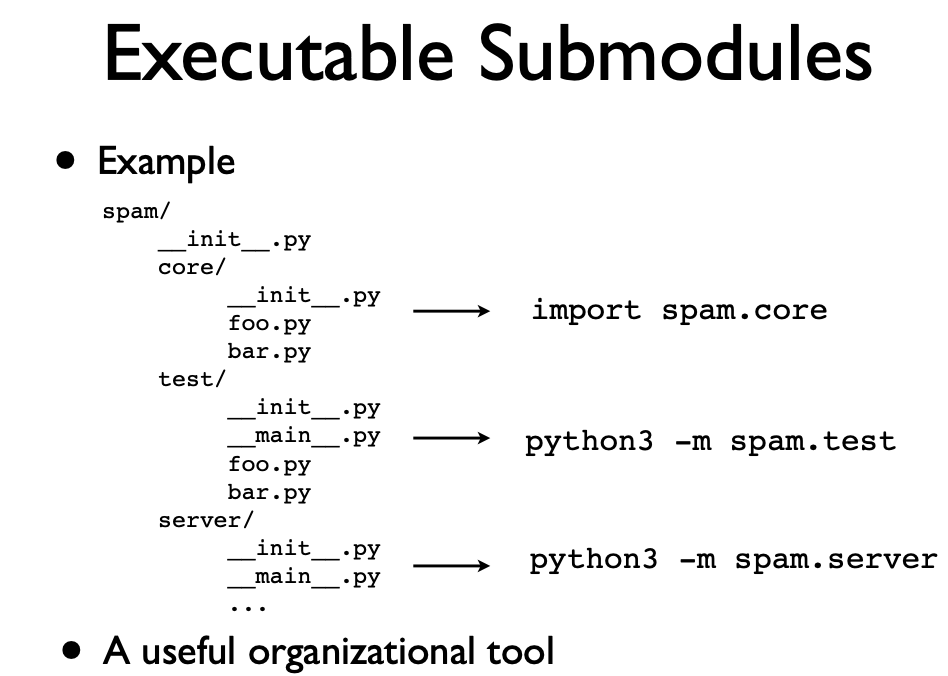
A directory or zip file can itself be executable if it contains a __main__.py: python pkg/ (or python -m pkg) looks for pkg/__main__.py and runs it as the entry point, with the relevant __init__.py files still executing first.
Figure 2: Executable submodules. A __main__.py inside a subpackage turns it into a runnable entry point: python -m spam.test executes spam/test/__main__.py (after running spam/__init__.py and spam/test/__init__.py), while a subpackage without one, like spam.core, is import-only. (Slide from David Beazley’s “Modules and Packages: Live and Let Die!”)
Whether __main__.__spec__ is set reflects all of this: launched with -m (or as a directory or zip), __spec__ holds the corresponding module spec; launched as a plain script or with -c, it is None.
8. Gotchas and Failure Modes
8.1 reload creates zombies
importlib.reload does not give you a clean slate. It re-executes the module’s source into the same __dict__, so names from the previous version linger, and, worse, any class statement produces a brand-new class object while the old instances keep pointing at the old one. The two classes share a name but are not the same object:
write_module("widget.py", """ print("widget.py body ran") class Widget: pass""")import widgetold = widget.Widget()from importlib importreloadreload(widget) # re-runs the body into the SAME module dictnew = widget.Widget()# Same class *name*, but a different class object -> old instances are "zombies":old.__class__, new.__class__, type(old) istype(new), isinstance(old, widget.Widget)
widget.py body ran
widget.py body ran
(widget.Widget, widget.Widget, False, False)
Both objects report their class as widget.Widget, yet type(old) is type(new) is False and isinstance(old, widget.Widget) is False: old is now an instance of a class that no longer exists under that name. Reload also does not re-import already-loaded submodules (a reload-ed module that does import pandas keeps the old pandas). This is why reload is a REPL convenience, not a hot-swap mechanism: for anything stateful, restart the interpreter.
8.2 Prefer relative imports inside a package
Absolute imports (from mypackage.sub import thing) hard-code the package’s name into every import statement. Rename the package and every one of them breaks. Relative imports (from .sub import thing) refer to location, not name, and survive renames. Relative imports must use the from … import … form: import .sub is a syntax error, and a leading dot counts one level per dot (from ..pkg import x goes up two).
8.3 The cache is mutable
sys.modules is a plain dict, which is powerful and dangerous. Deleting a key forces a genuine reimport next time (a cleaner reset than reload). Aliasing a module under a second name (sys.modules["new"] = sys.modules["old"]) makes both names resolve to the same object. But setting an entry to None poisons that name: Python treats it as “known to be unimportable” and raises ModuleNotFoundError. Reach into the cache deliberately, not casually.
Conclusion
The import system rewards study out of all proportion to its size. Underneath import x is a four-step pipeline (find, create, execute, bind) dispatched through ordered lists of finders you can read and rewrite at runtime. Once you can see that pipeline, a whole class of problems stops being mysterious: shadowed modules, namespace packages that pick up the wrong directory, reloads that leave broken objects behind, plugin systems that must discover code dynamically.
Key Takeaways
import is a cached pipeline, not a keyword that reads a file. Find → create → execute → bind, with sys.modules short-circuiting everything after the first import.
A package is just a module with __path__. Regular packages (__init__.py) stop the search and win; namespace packages (no __init__.py) merge directories from across sys.path.
sys.path is only the PathFinder’s input. The real dispatch layer is sys.meta_path → PathFinder → sys.path_hooks → per-entry finder → loader.
The ModuleSpec is the hub. Finders produce specs; loaders consume them; create and execute are decoupled, which is what makes lazy loading possible.
Source is compiled once and cached as version-tagged bytecode in __pycache__, validated against the source’s timestamp and size.
Everything is pluggable. Prepend a finder to intercept imports, append one to catch failures: that’s all tracing, lazy imports, and auto-install really are.
Know the traps.reload creates zombie objects, absolute imports are brittle to renames, and writing to sys.modules can corrupt the cache.
NoteThe machinery is stable
The spec/finder/loader design has been in place since Python 3.4 and hasn’t fundamentally changed since. Learn it once and it applies to every modern Python: the contents of sys.meta_path vary by environment, but the shape of the pipeline does not.
References & Resources
Python documentation.The import system. The authoritative reference for everything here.
David Beazley.Modules and Packages: Live and Let Die! (PyCon 2015). The talk this post grew out of; the tracing, auto-install, and lazy-import demos trace back to it, and both figures are from its slides.