flowchart LR
    A["<b>Caffe</b><br/>Layers with forward/backward<br/>In-place updates<br/>C++ only"] --> B["<b>TensorFlow 1.x</b><br/>Static graph<br/>Compile-then-run<br/>Hard to debug"]
    B --> C["<b>PyTorch</b><br/>Dynamic graph<br/>Define-by-run<br/>Python-native"]
    C --> D["<b>Modern PyTorch</b><br/>torch.compile / JIT<br/>Best of both worlds"]
evergreen
Why Build a Deep Learning Framework from Scratch?
Every deep learning practitioner eventually runs loss.backward() and watches gradients flow. But what actually happens inside that call? Where do the intermediate tensors live? Why does your GPU run out of memory on a model that “should” fit? And why does reshaping a tensor sometimes silently copy gigabytes of data?
I built tiny_pytorch to answer these questions for myself. Along the way, I encountered nearly every foundational design decision that real frameworks like PyTorch, TensorFlow, and Caffe had to make and learned why they made them.
This post distills everything I learned into a coherent narrative. We’ll start from the framework-level design philosophy, work our way down to how bytes are laid out in memory, and then zoom back out to distributed training across multiple GPUs. The goal is intuition: mental models you can carry with you when debugging real systems.
The Evolution of DL Frameworks
Before writing a single line of code, it helps to understand the three philosophies that shaped modern deep learning frameworks. Each solved a real problem and introduced new ones.
Caffe: Everything Is a Layer
Caffe (C++ only) was beautifully simple. You defined your computation as a stack of layers, each implementing a forward() and backward() method. The backward pass was a direct implementation of the backpropagation algorithm, where each layer knew how to compute its own gradients, and updates happened in-place.
TipComposable but Rigid
Think of Caffe layers like a stack of Lego bricks. Each brick knows its own shape (forward) and how to “unstick” itself (backward). Simple, intuitive, but rigid: you can’t easily build non-linear architectures.
TensorFlow 1.x: The Static Graph
TensorFlow introduced a powerful idea: construct a static computation graph first, then execute it. This separation of definition and execution unlocked serious optimizations; the compiler could fuse operations, reuse memory, and skip unnecessary computations at run-time.
The cost? Debugging was painful. You couldn’t just print a tensor mid-computation. The graph had its own “programming language” that felt alien to Python developers. Experimentation slowed down because every change required rebuilding the graph.
PyTorch: Define by Run
PyTorch flipped the script with dynamic computation graphs: the graph is built on-the-fly as you execute operations. This is called define by run. You can mix Python control flow (if/else, loops) directly with tensor operations, set breakpoints anywhere, and inspect intermediate values trivially.
The trade-off? Dynamic graphs are typically harder to optimize ahead of time. You lose the global view that static compilation provides. Modern PyTorch addresses this with torch.compile() and JIT compilation, getting closer to static-graph performance while keeping the dynamic-graph developer experience.
NoteThree Competing Goals
Every DL framework navigates three competing goals: ease of debugging, optimization potential, and flexibility. Caffe optimized for simplicity, TensorFlow for optimization, and PyTorch for flexibility. No framework gets all three for free.
Key takeaway: Framework design is fundamentally about when the computation graph is known. Know it early (static) and you can optimize aggressively. Know it late (dynamic) and you can iterate fast. Modern systems try to give you both.
Automatic Differentiation
Automatic differentiation (AD) is the core engine of every deep learning framework. It’s what makes loss.backward() work. But there are two fundamentally different approaches, and understanding why we use one over the other is essential. I dig into forward versus reverse mode, dual numbers, and the memory trade-off in a companion post, Automatic Differentiation Demystified.
Forward Mode AD
In forward mode, we walk from inputs to outputs. At each node, we compute the partial derivative of that node with respect to a single input variable. This means:
- For each input variable, we need a full forward pass through the graph.
- If we have \(n\) inputs, we need \(n\) forward AD passes.
For a typical deep learning loss function (a scalar output with millions of input parameters), this is catastrophically inefficient. We’d need millions of passes just to get one gradient update.
Reverse Mode AD (Backpropagation)
Reverse mode flips the direction. We walk from the output back to inputs, computing the gradient of the scalar output with respect to all input nodes in a single backward pass. This is why it’s the standard for deep learning: one output, millions of inputs, one pass. I implement both passes by hand, and check them against numerical gradients, in Coding Neural Network: Forward and Backward Propagation.
flowchart TD
    subgraph forward["Forward Mode (one pass per input)"]
        direction LR
        x1f["x₁"] --> |"∂a/∂x₁"| af["a"] --> |"∂b/∂x₁"| bf["b"] --> |"∂L/∂x₁"| Lf["L"]
    end

    subgraph reverse["Reverse Mode (one pass for ALL inputs)"]
        direction RL
        Lr["L"] --> |"∂L/∂b"| br["b"] --> |"∂L/∂a"| ar["a"] --> |"∂L/∂x₁<br/>∂L/∂x₂<br/>∂L/∂x₃"| xr["x₁, x₂, x₃"]
    end
ImportantThe Memory Cost of Reverse Mode
Reverse mode has a catch: to compute gradients during the backward pass, we need the intermediate values from the forward pass. For each operation, we must store the input tensors and remember which operation created them. This is why training uses far more memory than inference: all those “saved tensors” accumulate on the graph.
Here’s what the autograd system actually tracks:
flowchart LR
    x["Input x<br/><i>leaf tensor</i>"] --> mul["Mul"]
    w["Weight W<br/><i>leaf tensor</i>"] --> mul
    mul --> |"z = W·x<br/><b>saved: W, x</b>"| act["ReLU"]
    act --> |"a = relu(z)<br/><b>saved: z</b>"| loss_fn["MSELoss"]
    y["Target y"] --> loss_fn
    loss_fn --> |"L = loss(a, y)<br/><b>saved: a, y</b>"| L["Scalar Loss L"]

    L -.-> |"backward()"| loss_fn
    loss_fn -.-> act
    act -.-> mul
    mul -.-> x
    mul -.-> w
The dashed arrows show the backward pass, which retraces the forward graph in reverse. At each node, the saved tensors are consumed to compute local gradients.
TipGradients as Directional Information
The gradient at each node tells you: “In which direction would changing this value increase the loss most steeply?” It points toward steepest ascent, which is the direction of maximum loss increase. To decrease the loss, we move in the negative gradient direction. This is why gradient descent subtracts the gradient from the parameters: \(\theta \leftarrow \theta - \alpha \nabla_\theta L\).
One powerful consequence: the backward pass itself builds a computation graph for the gradients. This means you can compute gradients of gradients simply by adding more operations, which is exactly what second-order methods and some meta-learning approaches do.
Key takeaway: Reverse mode AD gives us all gradients in one pass, but the price is memory: every intermediate tensor from the forward pass must be kept alive until it’s consumed by the backward pass.
Memory Layout: Shapes, Strides, and the View/Copy Divide
This is where the rubber meets the road. Understanding how tensors are stored in memory explains a surprising number of performance issues and subtle bugs.
The Flat Array Reality
Whether you’re on CPU or GPU, the hardware gives you a flat, contiguous block of memory. There are no “dimensions” at the hardware level, just consecutive slots. To create the illusion of an N-dimensional array, we need three pieces of metadata:
- Shape: The logical dimensions (e.g.,
[3, 4]for a 3×4 matrix) - Stride: How many elements to skip in the flat array to move one step along each dimension
- Offset: Where the data starts within the flat array
NoteRow-Major vs. Column-Major via Strides
For a 2D array A with shape [R, C]:
- Row-major (C/NumPy/PyTorch default):
stride = [C, 1], rows are contiguous - Column-major (Fortran/BLAS):
stride = [1, R], columns are contiguous
Most BLAS libraries (the workhorses of linear algebra) are implemented in Fortran and expect column-major layout. This is why you sometimes see frameworks internally transposing data before calling into BLAS routines.
Views: Same Memory, Different Perspective
The stride mechanism enables something powerful: multiple tensor objects can share the same underlying memory with different shapes, strides, and offsets. These are called views. Three critical operations create views, not copies:
| Operation | What Changes | Memory Cost |
|---|---|---|
| Slice | Offset + shape + stride | Zero (view) |
| Transpose | Strides are swapped, shape changes | Zero (view) |
| Broadcast | Stride set to 0 along new dims | Zero (view) |
| Reshape/View | Shape + stride (if compatible) | Zero or copy |
WarningWhen Reshape Becomes a Copy
reshape / view can create a view only when the new shape is compatible with existing strides (i.e., the data is already contiguous in the right order). If the tensor has been transposed or sliced in a way that makes the data non-contiguous, reshape must copy the data into a new contiguous block. This can silently allocate gigabytes of memory.
How to detect it: In PyTorch, call tensor.is_contiguous() before reshaping. If it returns False, the reshape will trigger a copy. Use tensor.contiguous() explicitly to make the copy intentional and visible.
The Contiguity Problem
After operations like slicing or transposing, the logical tensor and the physical memory layout can diverge. The tensor is no longer compact, which means the offset isn’t 0 or the strides don’t correspond to row-major order.
This matters because many operations (especially matrix multiplication) require contiguous data for efficient memory access. The framework typically handles this by checking compactness before an operation and creating a contiguous copy if needed. But this implicit copy is a hidden performance cost.
flowchart TD
    flat["Flat memory: [a b c d e f g h i j k l]"] --> orig["Tensor A<br/>shape=[3,4], stride=[4,1], offset=0"]
    flat --> slice["Slice A[0:2, 1:3]<br/>shape=[2,2], stride=[4,1], offset=1<br/><b>VIEW (shared memory)</b>"]
    flat --> trans["A.T<br/>shape=[4,3], stride=[1,4], offset=0<br/><b>VIEW (shared memory)</b>"]

    trans --> |"reshape(-1) on<br/>non-contiguous tensor"| copy["New flat memory<br/><b>COPY (new allocation)</b>"]
TipRule of Thumb
If you chain transpose + reshape, you’re almost certainly triggering a copy. If you’re in a hot loop or a custom kernel, this matters. Profile with torch.cuda.memory_allocated() to catch surprise allocations.
Key takeaway: Tensors are flat arrays dressed up with metadata. Operations that only change metadata (slice, transpose, broadcast) are free. Operations that need physically contiguous data may silently copy. Know which is which.
Broadcasting and Its Gradient Implications
Broadcasting is one of the most convenient features in numerical computing, and one of the most misunderstood when it comes to gradients.
The Forward Pass: Implicit Repetition
When you add a bias vector b of shape [1, C] to an activation matrix A of shape [N, C], broadcasting logically repeats b along the batch dimension N times. But crucially, no data is copied. The framework simply sets the stride to 0 along the broadcast dimension, so the same values are read repeatedly.
The Backward Pass: Sum-Reduce
Here’s the subtle part. During the backward pass, if a value was broadcast (repeated) across a dimension, the gradients must be summed along that dimension. Why? Because the same parameter contributed to multiple outputs, so its total influence is the sum of all its partial effects.
flowchart LR
    subgraph fwd["Forward: broadcast adds"]
        direction TB
        A_fwd["A: shape [N, C]"] --> plus["+ (broadcast)"]
        b_fwd["b: shape [1, C]<br/>(stride 0 on dim 0)"] --> plus
        plus --> out_fwd["Output: shape [N, C]"]
    end

    subgraph bwd["Backward: sum-reduce"]
        direction TB
        grad_out["∂L/∂Output: shape [N, C]"] --> sum_op["sum(dim=0)"]
        sum_op --> grad_b["∂L/∂b: shape [1, C]"]
        grad_out --> grad_A["∂L/∂A: shape [N, C]<br/>(passed through directly)"]
    end

    fwd --> |"backward()"| bwd
Worked example:
Suppose A has shape [3, 2] and b has shape [1, 2] with values [0.5, -0.3]. After broadcasting, every row of A gets the same bias added. If the upstream gradient ∂L/∂Output is:
[[1.0, 2.0],
 [0.5, 1.5],
 [0.3, 0.7]]
Then ∂L/∂b = sum along dim 0 = [1.8, 4.2], because b influenced all three rows.
NoteGeneral Rule
For any operation in autograd: the gradient of a broadcast is a reduction, and the gradient of a reduction is a broadcast. This duality shows up everywhere: in loss functions, in normalization layers, and in attention mechanisms.
Key takeaway: Broadcasting doesn’t copy data (strides handle it), but gradients must sum-reduce along every dimension that was broadcast. Forgetting this is a common source of shape mismatch bugs in custom autograd functions.
Hardware Acceleration: From Strides to Silicon
Understanding the hardware layer helps you write code that runs fast by default instead of fighting the machine.
Memory Alignment
Hardware loads data into caches in fixed-size chunks called cache lines (typically 64 bytes). If your data is aligned to cache line boundaries, a single load brings in exactly what you need. If it’s misaligned, you need two loads for data that spans a boundary, doubling the memory traffic for that access.
TipPractical Impact
Memory alignment mostly matters for custom kernels and low-level code. High-level frameworks handle this for you. But if you’re writing CUDA kernels or using ctypes to interface with C libraries, ensure your allocations are aligned.
Parallelization with OpenMP
On CPU, the simplest form of parallelism is loop parallelization. Tools like OpenMP let you annotate a loop with #pragma omp parallel for, and the runtime splits iterations across CPU cores automatically.
This is the basis for CPU-accelerated tensor operations. Each core processes a different slice of the tensor, and the results are combined. The bottleneck shifts from compute to memory bandwidth: reading and writing large tensors becomes the limiting factor, not arithmetic.
The im2col Trick: Convolution as Matrix Multiplication
Convolution is the most compute-intensive operation in CNNs. The im2col (image-to-column) trick (Chetlur et al., 2014) converts convolution into matrix multiplication, which lets us use heavily optimized BLAS routines.
The process for a batch of images (N × H × W × Cᵢₙ) with filters (K × K × Cᵢₙ × Cₒᵤₜ):
- Create a 6D strided view:
N × H_out × W_out × K × K × Cᵢₙ - Reshape to a 2D im2col matrix:
(N·H_out·W_out) × (K·K·Cᵢₙ) - Reshape weights to 2D:
(K·K·Cᵢₙ) × Cₒᵤₜ - Matrix multiply:
im2col @ weights - Reshape result:
N × H_out × W_out × Cₒᵤₜ
Warningim2col Memory Overhead
The im2col matrix is typically much larger than the original image tensor because filter patches overlap. Each input pixel appears in multiple rows of the im2col matrix. The reshape from the 6D strided view to 2D cannot be done as a view (the data isn’t contiguous in the right order), so it triggers a full copy. This is a significant memory cost: for large images with many channels, the im2col matrix can be several times the size of the input.
When it helps: When your BLAS library is highly optimized (which it usually is). The speedup from using GEMM far outweighs the memory copy cost.
When it hurts: When you’re memory-constrained. Alternative approaches like FFT-based convolution or Winograd transforms can reduce memory usage at the cost of implementation complexity.
Key takeaway: The gap between “logical operations on tensors” and “what the hardware actually does” is large. Frameworks bridge it with tricks like im2col, cache-aware memory layout, and loop parallelization. When performance matters, understanding this layer is essential.
Weight Initialization: The Effects That Persist
Weight initialization might seem like a minor detail: just pick some random numbers and start training. But the evidence tells a more nuanced story. I implement several initialization schemes from scratch and watch their effect on training in Coding Neural Network: Parameters’ Initialization.
Why Initialization Matters
Two observations that changed how I think about initialization:
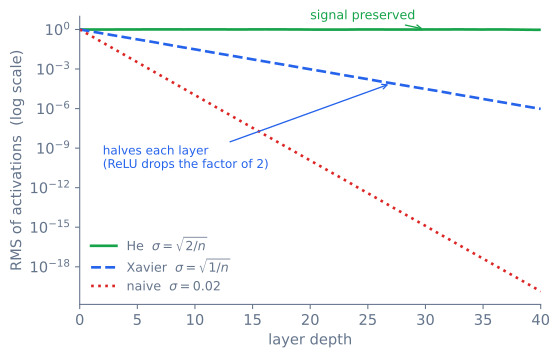
The effect of initialization persists throughout training. Bad initialization affects the relative norms of activations and gradients at every step. If you don’t initialize appropriately (e.g., using a standard deviation of \(\sqrt{\frac{2}{n}}\) for ReLU networks, known as He initialization), the L2-norm of activations or gradients will drift: vanishing signals or exploding values.
Weights don’t move far from their initial values. This is surprising. If you plot the variance of weights before and after training for each layer, you’ll see remarkably similar values. The weights shift in certain directions, but relative to their initial magnitude, the change is small especially for deep networks.
NoteThe Implication
Together, these observations mean initialization isn’t just “where you start”, it effectively defines the neighborhood of weight space you’ll explore during training. Proper initialization puts you in a good neighborhood. Bad initialization puts you somewhere the optimizer can’t easily escape.
Why \(\sqrt{2/n}\)
Where does the \(\sqrt{2/n}\) come from? Take one layer \(y = Wx\) with fan-in \(n\), weights drawn i.i.d. with mean zero and variance \(\sigma^2\), and an input \(x\) whose components are i.i.d. Each output is a sum of \(n\) independent products, so
\[\operatorname{Var}(y) = n\,\sigma^2\,\operatorname{Var}(x).\]
For the signal to neither grow nor shrink through the layer, we need \(n\sigma^2 = 1\), i.e. \(\sigma^2 = 1/n\). That is Xavier initialization, and it is right for a linear layer. A ReLU network is not linear: ReLU zeroes the negative half of a zero-mean pre-activation, halving the second moment of what passes through, \(\mathbb{E}[\operatorname{ReLU}(y)^2] = \tfrac{1}{2}\mathbb{E}[y^2]\). Folding that factor into the balance condition gives \(\tfrac{1}{2}n\sigma^2 = 1\), so \(\sigma^2 = 2/n\). That is He initialization, and the factor of 2 is the entire difference from Xavier: it compensates for the half of the signal ReLU discards. Under Xavier each ReLU layer loses a factor of \(\sqrt2\) in activation scale, so after \(L\) layers the signal is down by \((1/\sqrt2)^{L}\); by 40 layers that is about \(10^{-6}\).
How to Diagnose Initialization Problems
Monitor two metrics across layers over all training iterations:
- Norm of weights per layer
- Norm of gradients per layer
If the weight norms explode or collapse across layers, or if gradient norms vary by orders of magnitude between early and late layers, your initialization is likely wrong. Proper initialization keeps these norms roughly stable across layers.
Key takeaway: Proper weight initialization speeds up training and leads to lower final error rates. It defines the effective search region for your optimizer, and its influence persists throughout training.
Normalization: Fixing What Initialization Can’t
If we know that activation norms can drift during training (due to imperfect initialization or the dynamics of optimization itself), why not just force them to be well-behaved? That’s the idea behind normalization layers.
Batch Normalization
Batch Normalization normalizes activations across the batch dimension for each feature independently. For a given feature, it computes the mean and variance across all examples in the batch, then normalizes to zero mean and unit variance.
When it helps:
- Dramatically speeds up training by maintaining stable activation norms
- Preserves the discriminative information between features within each layer (because normalization is per-feature, not per-example)
When it hurts:
- Creates dependency between samples in a batch: each example’s normalized activation depends on the other examples in the batch
- Unstable with small batches: statistics become noisy, and with a batch of 1, the variance is undefined
- Doesn’t work well with RNNs: the hidden state has temporal dependencies across time steps, and computing batch statistics independently at each time step ignores this structure
Layer Normalization
Layer Normalization normalizes across all features for each sample independently. No dependency on other samples in the batch.
When it helps:
- Works with any batch size, including batch size 1
- Perfect for RNNs and Transformers: it normalizes across the embedding dimension for each token in each example, respecting temporal structure
- This is why it’s the standard in Transformer architectures
When it hurts:
- For fully connected networks, forcing zero mean and unit variance across features can destroy the relative magnitude differences between activations for different examples. These magnitude differences can be an important discriminative signal.
- This makes it harder to drive loss low on tasks where inter-example feature magnitude differences matter
ImportantChoosing Between Them
Use BatchNorm for CNNs with reasonably large batches (≥32). Use LayerNorm for Transformers, RNNs, and any setting where batch size is small or variable.
Key takeaway: Normalization layers fix the activation drift that initialization can only partially prevent. BatchNorm and LayerNorm make different trade-offs about what to normalize over, and the right choice depends on your architecture and batch size.
Regularization: Controlling Complexity
Regularization prevents models from memorizing the training data, forcing them to learn patterns that generalize to unseen examples.
Implicit Regularization
Before you add any explicit regularization, your training procedure already constrains the model. SGD with a particular initialization only explores a subset of all possible neural networks. The initialization defines the starting point, and the optimizer’s dynamics (step size, momentum, batch sampling) determine the trajectory through weight space. I derive SGD, momentum, and Adam from scratch in Gradient Descent and Its Variants.
This is called implicit regularization, and it’s powerful. The fact that SGD-trained networks generalize well, even when they have enough capacity to memorize the training set, is partly due to these implicit biases of the optimization procedure.
Explicit Regularization
Explicit regularization directly limits the functions the model can learn:
L2 Regularization adds a penalty proportional to the squared magnitude of the weights. The premise: smoother functions (which don’t change dramatically for small input changes) tend to have smaller weights. By penalizing large weights, we encourage smoother, simpler functions. I code L2 regularization from scratch in Coding Neural Network: Regularization.
Dropout randomly zeroes out activations with probability \(p\) during training. A useful mental model: dropout is a stochastic approximation of each layer’s activations, similar to how SGD approximates the full gradient with a mini-batch sample. During inference, we multiply activations by \(\frac{1}{1-p}\) (or equivalently, scale during training) to keep the expected value consistent. I implement dropout from scratch in Coding Neural Network: Dropout.
WarningL2 Regularization ≠ Weight Decay (for Adam!)
For vanilla SGD, L2 regularization and weight decay are mathematically equivalent. But for adaptive optimizers like Adam, they are not the same.
Why? Adam computes first and second moments of the gradients. If you add the L2 penalty to the gradient (L2 regularization), the penalty gets scaled by Adam’s adaptive learning rate, making it less effective than intended. Weight decay, which adds the penalty directly to the parameter update step without modifying the gradient, avoids this issue.
This distinction was first identified in the “Decoupled Weight Decay” paper (AdamW), which is why AdamW is preferred over Adam + L2 regularization in practice.
Key takeaway: Regularization operates at two levels: the implicit biases of SGD and initialization, and explicit penalties like L2/weight decay and dropout. For Adam-family optimizers, always use weight decay (AdamW), not L2 regularization.
Scaling Up: When One GPU Isn’t Enough
Large datasets demand large models, and large models push hardware to its limits. Here’s how the systems community addresses this.
The Memory Bottleneck
The memory hierarchy tells the story:
- Shared memory per core (GPU): ~64 KB, fast and tiny
- Global GPU memory: 10–80 GB depending on the device, the typical bottleneck
- CPU RAM: 64–512 GB, large but slow to access from GPU
Most large models can’t fit entirely in GPU global memory during training, because we need to store: model parameters, optimizer state (2x or 3x model size for Adam), activations (saved for backward), and gradients.
Memory-Saving Techniques
Inference: Buffer Reuse
During inference, we don’t need to keep activations for backward. We can reuse a small set of buffers (2 or 3) across layers, writing each layer’s output into a buffer that a previous layer no longer needs. This reduces memory from O(N) to O(1) in the number of layers.
Training: Activation Checkpointing
During training, we normally keep all activations for the backward pass. Checkpointing trades memory for compute:
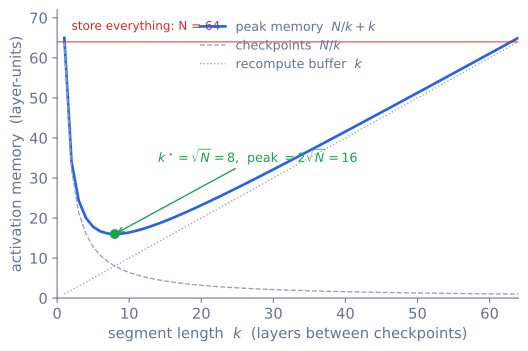
- Divide the network into segments of roughly \(\sqrt{N}\) layers
- Only store activations at segment boundaries (checkpoints)
- During the backward pass, recompute the forward pass within each segment to recover the needed activations
Why \(\sqrt{N}\) segments? Store a checkpoint every \(k\) layers. During the backward pass two things sit in memory: the checkpoints themselves, \(N/k\) of them, and, while recomputing one segment, up to \(k\) activations inside it. Peak activation memory is therefore \(M(k) = N/k + k\). Minimizing over \(k\) gives \(M'(k) = -N/k^2 + 1 = 0\), so \(k = \sqrt N\) and the peak is \(2\sqrt N\). Storing everything, \(O(N)\), drops to \(O(\sqrt N)\) for the price of recomputing each segment once, a single extra forward pass (Chen et al., 2016).
flowchart LR
    subgraph seg1["Segment 1"]
        L1["Layer 1"] --> L2["Layer 2"] --> L3["Layer 3"]
    end
    subgraph seg2["Segment 2"]
        L4["Layer 4"] --> L5["Layer 5"] --> L6["Layer 6"]
    end
    subgraph seg3["Segment 3"]
        L7["Layer 7"] --> L8["Layer 8"] --> L9["Layer 9"]
    end

    seg1 --> |"✓ checkpoint"| seg2
    seg2 --> |"✓ checkpoint"| seg3
| Approach | Memory | Compute Overhead |
|---|---|---|
| No checkpointing | O(N) activations |
None |
| \(\sqrt{N}\) checkpoints | O(√N) activations |
~1 extra forward pass |
| Aggressive checkpointing | O(1) activations |
Up to N extra forward passes |
TipSmart Checkpoint Placement
Choose checkpoints at layers with cheap recomputation. ReLU activations are trivial to recompute (just check sign). Convolution or attention layers are expensive. Checkpoint after cheap layers to minimize the recomputation cost.
Distributed Training: Data and Model Parallelism
When one GPU isn’t enough, we spread the work across multiple devices. There are two fundamental strategies:
flowchart TD
    DT["Distributed Training"] --> DP["<b>Data Parallelism</b><br/>Same model, different data"]
    DT --> MP["<b>Model Parallelism</b><br/>Different parts of model"]

    DP --> PS["Parameter Server<br/>Central coordinator"]
    DP --> AR["AllReduce<br/>Peer-to-peer"]

    MP --> TP["Tensor Parallelism<br/>Split layers across devices"]
    MP --> PP["Pipeline Parallelism<br/>Different layers on different devices"]
Data Parallelism
Every worker runs a full replica of the model on a different micro-batch. Since gradients are additive (they’re independent across examples), we just need to sum them across workers before performing the weight update.
Two coordination strategies:
Parameter Server: A central server collects gradients from all workers, sums them, performs the update, and broadcasts the new weights. Workers can start sending gradients as soon as they’re computed (layer by layer), overlapping communication with computation.
- Bottleneck: The parameter server becomes a communication bottleneck as the number of workers grows. All traffic flows through one node.
AllReduce: A peer-to-peer approach where all workers collectively sum their gradients and each receives the result. No central bottleneck: communication scales more gracefully. Algorithms like Ring-AllReduce distribute the bandwidth load evenly.
- Bottleneck: Total communication volume still grows with model size. Network bandwidth between nodes becomes the limiting factor.
ImportantWhen Communication Dominates
Communication overhead dominates training time when:
- Model is large relative to batch computation time (small compute-to-communication ratio)
- Network bandwidth is low (especially across nodes vs. within a node with NVLink)
- Gradient compression isn’t used
Rule of thumb: if your per-step compute time is less than 3x the gradient synchronization time, communication is your bottleneck. Scale batch size or use gradient compression/accumulation to amortize the cost.
Model Parallelism (Pipeline Parallelism)
When the model itself doesn’t fit on one device, we split the computation graph across devices (Huang et al., 2019). Each device handles a different set of layers, and they pipeline the computation: while device 2 processes micro-batch 1, device 1 can start on micro-batch 2.
Communication happens at layer boundaries via send/recv operations. The challenge is minimizing pipeline bubbles, which is idle time when a device is waiting for input from the previous stage.
Key takeaway: Scaling from one GPU to many introduces a new bottleneck: communication. Data parallelism is simpler and scales well when the model fits on one device. Model/pipeline parallelism is necessary when it doesn’t, but introduces pipeline bubbles and more complex communication patterns.
Neural Network Architectures Through a Systems Lens
The remaining sections cover architectures not as algorithmic curiosities, but as systems design decisions: what problem does each one solve, and what trade-off does it introduce?
Convolutional Neural Networks (CNNs)
CNNs exploit three structural priors about spatial data:
| Property | What It Means | Systems Benefit |
|---|---|---|
| Parameter sharing | Same filter everywhere in the image | Massive reduction in parameters |
| Sparse connectivity | Each output depends only on a local receptive field | Few computations per output pixel |
| Translation equivariance | Shifting input shifts output the same way | No need to learn position-specific detectors |
Dilation increases the receptive field without increasing parameters: each filter element is spread out by a dilation factor, giving access to a larger spatial area. This is particularly useful for temporal problems where context matters.
NoteConvolution as Matrix Multiplication
We can express convolution as a matrix multiplication where the weight matrix has a specific sparsity pattern (filled with actual weights and zeros reflecting the filter structure). We don’t actually construct this matrix (it would be enormous), but this view explains why the backward pass of a convolution is a convolution with a flipped filter: multiplying by the transpose of the convolution matrix is equivalent to convolving with the spatially flipped kernel.
Recurrent Neural Networks (RNNs)
RNNs address temporal dependencies by maintaining a hidden state that gets updated at each time step as a function of the current input and the previous hidden state. In theory, the last hidden state captures the entire input history.
In practice, the hidden state is a bottleneck. The entire past is compacted into a single vector, and information from early time steps (\(x_1\)) gets diluted compared to recent ones (\(x_t\)).
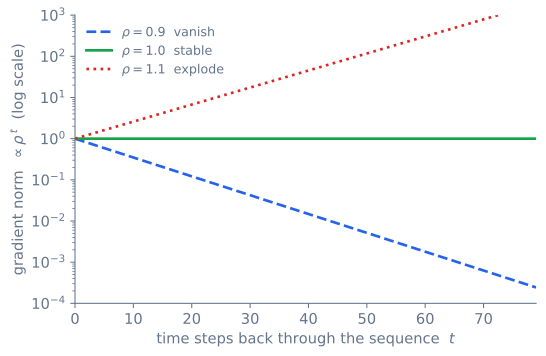
Backpropagation Through Time (BPTT): Because weights are shared across time steps, gradients must flow through the entire unrolled sequence. If the dominant eigenvalue of the weight matrix is less than 1, gradients vanish exponentially with sequence length. Greater than 1, they explode.
Concretely, the gradient reaching an early hidden state is a product of one per-step Jacobian for every step it travels back, so along the repeated direction it scales like \(\rho^{\,t}\), where \(\rho\) is that dominant eigenvalue magnitude and \(t\) is the number of steps. Any \(\rho \neq 1\) is unstable over long sequences, and no single value is safe at every horizon.
LSTM: Gating the Information Flow
LSTMs address vanishing gradients by separating the hidden state into two components:
- Cell state: A “highway” for long-range information flow
- Hidden state: The working memory exposed to the next layer
Four gates (learned transformations) control information flow at each step:
- Forget gate: What information from the cell state to discard
- Input gate: What new information to add to the cell state
- Cell update: The candidate new information
- Output gate: What to expose as the hidden state
I build an LSTM cell from scratch, gate by gate, and profile where the time actually goes in Inside LSTMs.
WarningLSTMs Don’t Fully Solve Long-Range Dependencies
Despite the gating mechanism, both RNNs and LSTMs struggle with information far in the past. Recent tokens have a much more direct connection to the current hidden state. The cell state highway helps, but it’s not a complete solution for very long sequences. This is the fundamental motivation for attention mechanisms.
Transformers: Global Receptive Field via Attention
Transformers replace recurrence with attention, which gives every position direct access to every other position, a global receptive field.
However, the attention mechanism is inherently order-invariant: permuting the input tokens permutes the output in the same way. There’s no notion of “first” or “last.” This is why positional encodings are essential: they inject order information that attention alone cannot capture.
For autoregressive tasks (language modeling, text generation), a causal mask restricts each position to attend only to current and previous positions, preserving the left-to-right generation constraint. I walk through attention, positional encodings, and masking in The Transformer Architecture: A Deep Dive, then assemble them into a working model in Building GPT from Scratch.
GANs: Adversarial Generation
GANs learn to generate data by pitting two networks against each other:
- Generator: Takes a random noise vector and tries to produce realistic images. Its objective is to maximize the discriminator’s error, making the discriminator believe the fake images are real.
- Discriminator: Receives both real and generated images and tries to classify them correctly. It minimizes its classification loss.
The discriminator acts as a learned loss function that guides the generator toward producing increasingly realistic outputs. The “adversarial” aspect refers to the generator learning to exploit subtle distributional differences that are imperceptible to humans.
Conv2dTranspose (Deconvolution): The generator typically needs to upsample from a small latent vector to a full-resolution image. Transposed convolution reverses the spatial dimension change of convolution: taking a small spatial input and producing a larger spatial output.
Key takeaway: Each architecture encodes different assumptions about data structure. CNNs assume spatial locality. RNNs assume temporal ordering. Transformers assume that global relationships matter and let attention learn what to focus on. GANs assume that the best loss function is a learned one.
Model Deployment Considerations
Training a model is only half the battle. Deploying it introduces a different set of constraints:
- Application environment restrictions: Model size limits, no Python runtime available (embedded/mobile)
- Hardware acceleration: Leveraging mobile GPUs, NPUs, or specialized CPU instructions (AVX, NEON)
- Integration: Fitting into existing application architectures and serving infrastructure
These constraints often drive post-training optimizations like quantization, pruning, distillation, and conversion to inference-specific formats (ONNX, TensorRT, Core ML).
How the Layers Interact
If you’ve made it this far, you’ve traced the full stack of a deep learning system:
- Framework design determines your development experience and optimization ceiling
- Autograd gives you gradients but demands memory for saved tensors
- Memory layout (strides, views, contiguity) determines whether operations are free or expensive
- Hardware acceleration turns logical operations into physical memory accesses and arithmetic
- Initialization and normalization keep training stable from start to finish
- Regularization prevents overfitting at both implicit and explicit levels
- Scaling trades communication overhead for the ability to train larger models
- Architecture choices encode structural assumptions about your data
These layers interact. Autograd’s saved tensors create memory pressure, which motivates checkpointing, which trades memory for recomputation. Initialization determines activation norms, which normalization layers can stabilize, which affects gradient flow, which determines whether training converges. Strides determine memory access patterns, which determine kernel performance, which determines whether you’re compute-bound or memory-bound.
TipWhy Building One Helps
The next time training is slow, memory is exploding, or loss isn’t decreasing, you’ll have a mental model of the full stack to reason about where the problem might be. That’s the real value of building a framework from scratch.
References
- Rumelhart, D., Hinton, G., & Williams, R. (1986). Learning Representations by Back-Propagating Errors. Nature, 323.
- Hochreiter, S. & Schmidhuber, J. (1997). Long Short-Term Memory. Neural Computation, 9(8).
- Glorot, X. & Bengio, Y. (2010). Understanding the Difficulty of Training Deep Feedforward Neural Networks. AISTATS.
- Jia, Y. et al. (2014). Caffe: Convolutional Architecture for Fast Feature Embedding. ACM MM.
- Goodfellow, I. et al. (2014). Generative Adversarial Networks. NeurIPS.
- Chetlur, S. et al. (2014). cuDNN: Efficient Primitives for Deep Learning.
- Srivastava, N. et al. (2014). Dropout: A Simple Way to Prevent Neural Networks from Overfitting. JMLR, 15.
- He, K. et al. (2015). Delving Deep into Rectifiers. ICCV.
- Ioffe, S. & Szegedy, C. (2015). Batch Normalization. ICML.
- Abadi, M. et al. (2016). TensorFlow: A System for Large-Scale Machine Learning. OSDI.
- Ba, J., Kiros, J., & Hinton, G. (2016). Layer Normalization.
- Chen, T. et al. (2016). Training Deep Nets with Sublinear Memory Cost.
- Vaswani, A. et al. (2017). Attention Is All You Need. NeurIPS.
- Sergeev, A. & Del Balso, M. (2018). Horovod: Fast and Easy Distributed Deep Learning.
- Huang, Y. et al. (2019). GPipe: Efficient Training of Giant Neural Networks Using Pipeline Parallelism. NeurIPS.
- Loshchilov, I. & Hutter, F. (2019). Decoupled Weight Decay Regularization. ICLR.
- Paszke, A. et al. (2019). PyTorch: An Imperative Style, High-Performance Deep Learning Library. NeurIPS.